

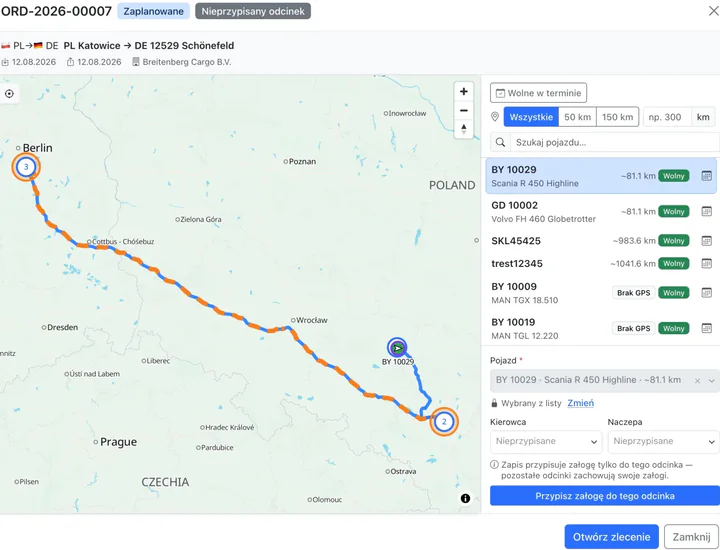
The nearest free vehicle in seconds
Got an order with no truck? LiteTMS ranks the nearest vehicles, checks their availability and schedules, and lets you assign a crew in one click, straight from the orders calendar.
How vehicle matching worksLogisticsERP is no longer being developed. Its successor is LiteTMS. What this means for you
Transport & freight forwarding software · since 2017
Changing lanes, not direction. For years, LogisticsERP helped transport companies and freight forwarders run their orders, fleets and paperwork. Everything we learned along the way went into LiteTMS, a new transport management system built from scratch. Faster to start, simpler to use every day, and billed only for what you actually use.
Last updated:
The LogisticsERP story
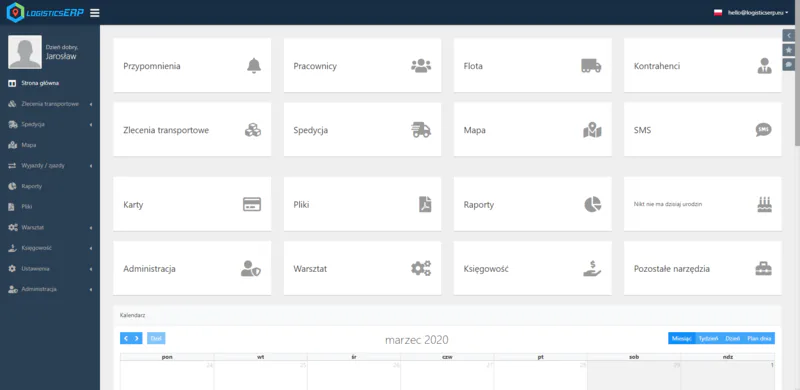
LogisticsERP launched in 2017 and spent years doing real work inside real transport companies. Dispatchers ran their orders in it, drivers sent updates from the road, and owners kept an eye on vehicles and documents. We could not have asked for a better school.
2017
Our first transport and freight forwarding system: orders, forwarding, fleet, accounting, reports and a driver app in one place.
Years on the road
Small exceptions turned out to be everyday work. We learned where information has to be within reach, and what every unnecessary click really costs.
The turn
Instead of adding yet another floor to an old building, we drew up a new plan. We took the experience and our customers’ questions with us, and left the old code behind.
Today
Companies are already running on LiteTMS. We onboard new teams personally, in small groups, and self-service signup is just around the corner.
A company should not have to learn the software before it can get back to transport. That is why the LiteTMS AI assistant walks new dispatchers through every step.
A feature can work perfectly and still get in the way if it hides three menus deep. In LiteTMS, the menu shows only the modules you actually use.
A quiet July and a non-stop December should not cost the same. Hence pay-as-you-go billing instead of a fixed package.
LogisticsERP vs LiteTMS
LiteTMS is not a reskin of LogisticsERP or a new version with a fresh logo. It is a new system. Here are the key differences.
| Area | LogisticsERP | LiteTMS |
|---|---|---|
| Status | No longer developed | Actively developed, with new features every week |
| Technology | First generation, extended layer by layer since 2017 | New code and a new architecture, built from scratch |
| Getting started | Rollout taking from a few days to a month | Personal onboarding plus an AI assistant: a dispatcher is up to speed in one afternoon |
| Pricing | Individually quoted plans | Pay-as-you-go: you pay for active users and the services you use |
| Fitting your company | Custom changes built to order by our developers | AI Builder: your own tabs and forms from one sentence, no developer needed |
| Driver app | Tasks, messages with the office, documents | One-tap statuses, CMR photos with geotag, offline mode, built-in translator |
LiteTMS: a new-generation TMS
One login, one database, one bill. Orders, fleet, drivers, documents and invoices work together, without copying data between programs or chasing the latest version of a spreadsheet.
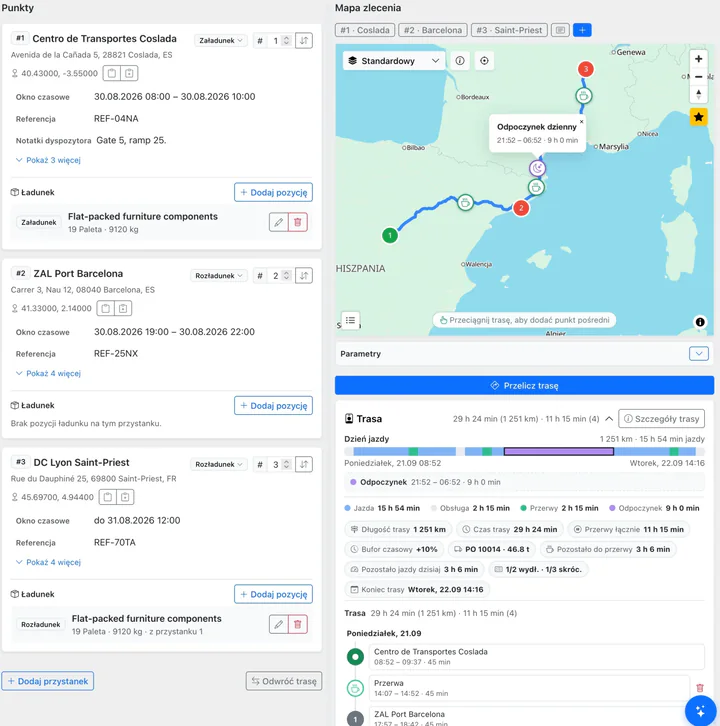
Got an order with no truck? LiteTMS ranks the nearest vehicles, checks their availability and schedules, and lets you assign a crew in one click, straight from the orders calendar.
How vehicle matching works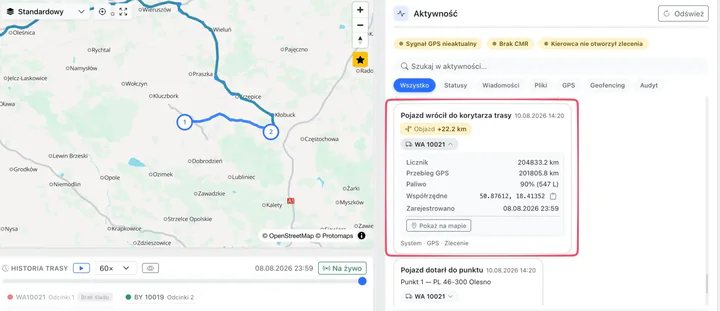
Draw a corridor around the planned route or a zone around a customer’s warehouse. You get an alert when a vehicle leaves the route or enters the zone, and the extra kilometres are counted for you.
More on route corridorsThe route plan accounts for driver breaks and rest periods, so the delivery time you give your customer is closer to what will actually happen on the road.
More on realistic ETAs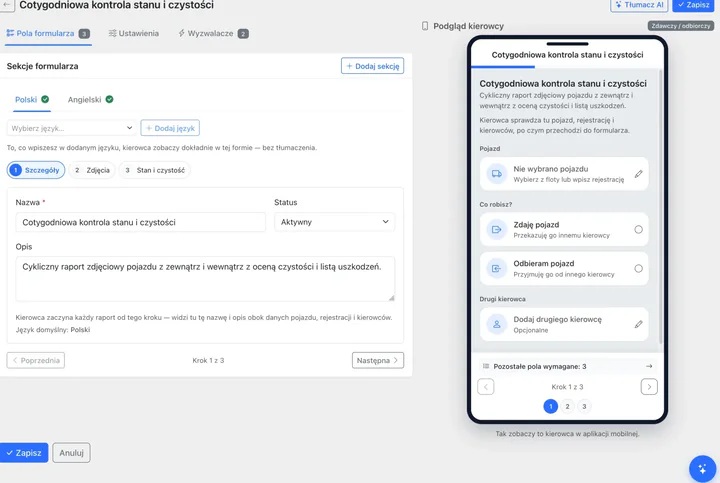
Build a vehicle handover checklist, a trailer check or a loading protocol. Drivers fill it in in their own language, with photos, and the full record lands on the order.
More on vehicle checksAsk in plain words: “where do I add a driver?”, “how do I close a CMR?”. The assistant opens the right screen and walks you through it.
ADR permits, fuel cards, tyres? Describe a tab in one sentence and AI Builder creates the fields, filters and reports.
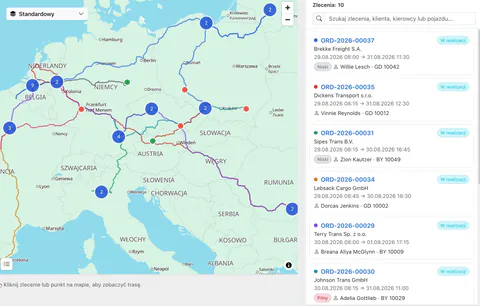
Every route, stop and GPS position for the day on one map, with search and filters that actually help.
A week of loads on one timeline, per vehicle or per driver. Gaps and clashes are visible at a glance.
Every CMR, POD and permit archived with its order, searchable and shareable via a secure link.
Invoice without retyping data, in foreign currencies too.
Your customers and carriers with contacts, deals and the full order history.
Office and drivers in one thread. Messages translate automatically into 184 languages.
Text a driver, a carrier or the contact at the unloading point, even if they don’t have the app.
Plan the trailer on screen: space, weight and axle loads checked before the forklift moves.
Insurance, inspections, licences: the system tracks expiry dates for you.
AI reads a transport order from a document, matches the data and shows what still needs fixing before you save it.
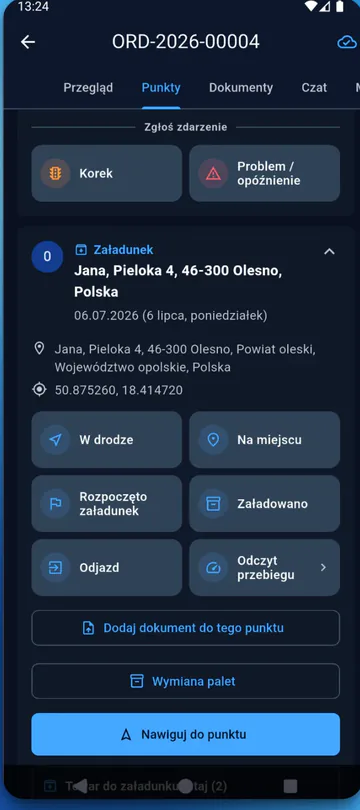
Driver app
The driver app was one of the pillars of LogisticsERP. With LiteTMS Driver we went further: less tapping, more information in the office, the very second a driver reports something.
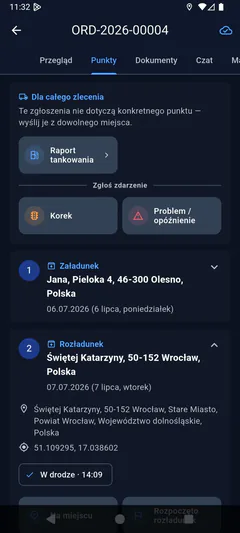
On the way, on site, loaded, departed: the order in the office updates itself.
A photo of the document, with location and time, goes straight to the right order and leg.
Dispatch adds a task to any stop, the driver completes it in the app and the proof lands on the order.
Traffic jam, problem, delay, fuel report: two taps instead of a five-minute call.
Drivers see exactly the route and stop order the office planned.
Download country maps before departure; statuses sync as soon as the signal returns.
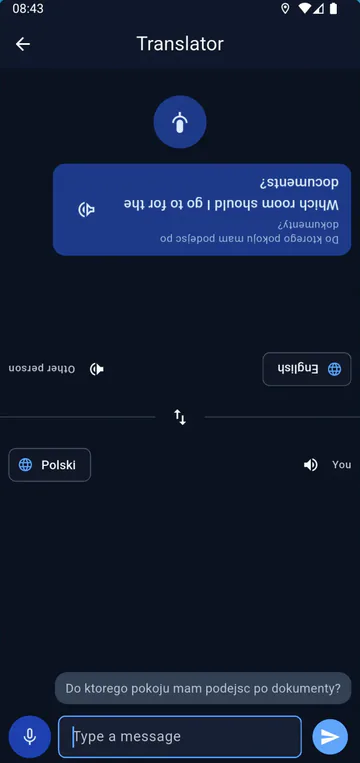
The driver speaks their language, the warehouse worker reads theirs, on two halves of one screen.
The driver app itself comes at no extra charge.
Pay-as-you-go pricing
Transport has no average month, so with LiteTMS you never buy a package just in case. You pay for active users and the paid services you actually use, and you can see rates and live usage in the panel before anything reaches your invoice.
One order or ten thousand: the meter never moves.
Your whole customer and carrier base, with no per-record fee.
No onboarding charge and no paid training.
Stop in any month you like.
How your bill follows the season
For LogisticsERP customers
Nobody gets left on the hard shoulder. We move LogisticsERP customers to LiteTMS personally, at a pace that suits your company.
Email [email protected] or use the contact form. We will agree on the timing and scope of the switch, with no obligation.
We create your LiteTMS workspace together with you and configure the first workflows around how your team works.
Import employees, vehicles, trailers and contractors from CSV or XLSX files: match the columns, check the preview, confirm. You can also ask our team to help with the migration.
Start with one lane or one dispatcher. With no setup fee and no minimum term, you have nothing to lose.
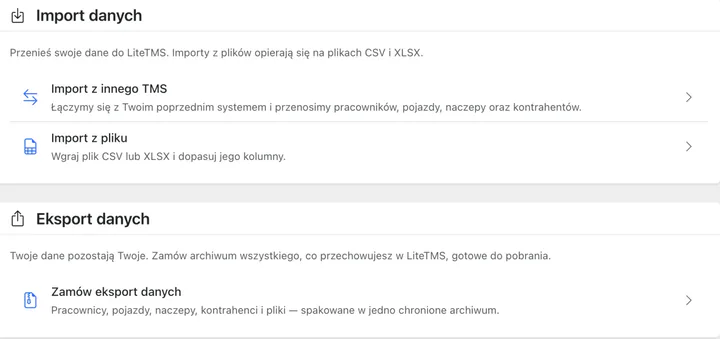
In LiteTMS you can request an export of your records and files at any time, as a ZIP archive protected by your own password.
Data import and export in LiteTMSWho it’s for
Whatever the size of your fleet: orders, drivers, deadlines and documents in one place, with no spreadsheet juggling.
Multi-stop orders, subcontractors and unlimited contractors. The full history of your work with every carrier.
Delivering with your own vehicles? Maps, statuses and vehicle checks without building a system from scratch.
Everything in spreadsheets and chat threads? Here is our guide to moving to a TMS without the chaos.
Security and trust
LiteTMS is run by a Polish company, production data is hosted in the EU, and every account comes with a signed Data Processing Agreement (DPA).
Two-factor login, role-based permissions and an immutable access log.
EU-hosted servers under continuous monitoring.
Support in Polish and English from real people, with quick answers.
Glossary
Short, plain-language definitions of the terms that come up when you choose transport software.
FAQ
Can’t see your question here? Write to us. Real people answer, not bots.
LogisticsERP is no longer being developed. We used the experience we gained from it since 2017 to build a new system: LiteTMS. Same team (CodeJungle Sp. z o.o.), but new code, a new architecture and a new pricing model.
No. LiteTMS was built from scratch. From LogisticsERP we took the experience and our customers’ questions, but not the old code. That let us design the system around a fast start, simpler daily work and fair pricing.
Write to us at [email protected]. We move LogisticsERP customers to LiteTMS personally: we agree on the timing, set up your workspace and help you import your records. You can work in parallel for a while before switching your whole team.
Yes. You can import employee, vehicle, trailer and contractor records into LiteTMS from CSV or XLSX files, with column matching and a preview before anything is saved. You can also ask the LiteTMS team to help with the data migration.
LiteTMS is billed pay-as-you-go. Orders and contractors are free and unlimited. You pay for active users and other account resources, and for paid services such as AI, SMS or premium maps. There is no setup fee and no minimum term, and you can see rates and usage in the panel before they reach your invoice.
No. LiteTMS has no minimum term and no setup fee. You can stop in any month, and your data stays exportable.
Yes: LiteTMS Driver. Drivers see their assigned orders and planned route, change statuses with one tap, photograph CMRs with geolocation and report problems without calling. The app also works offline, and it comes at no extra charge.
Yes. LiteTMS is built for carriers and forwarders: multi-stop orders, subcontractors, a contractor database with order history, documents and invoices in multiple currencies.
The web panel and mobile app are available in 41 interface languages, and chat messages translate automatically into 184 languages. Official support is provided in Polish and English.
Yes. It is operated by the Polish company CodeJungle Sp. z o.o., production data is hosted in the EU, and every account comes with a Data Processing Agreement (DPA).
Join the onboarding list at litetms.eu. We bring new companies on board personally, in small groups, and self-service signup is coming soon. If you would rather talk first, write to [email protected].
Both systems were built by CodeJungle Sp. z o.o., based in Panki, Silesia, Poland. We have been building software for transport companies since 2017.
LogisticsERP was the first leg of the journey. The next stop is LiteTMS: a system you can get running faster than you could plan a traditional rollout.